If you have been looking for a Windows alternative that is free, lightweight, customizable, and easy to use, Linux Mint continues to be one of the most interesting choices in the Linux ecosystem.
The latest release, Linux Mint 22.3 “Zena,” arrived in January 2026 with a collection of desktop improvements, new troubleshooting tools, Cinnamon enhancements, and usability updates. More importantly, it continues Linux Mint’s long-term-support approach, with security updates planned until 2029.
But what exactly has changed in Linux Mint 22.3, and is it worth upgrading?
Let’s take a closer look.
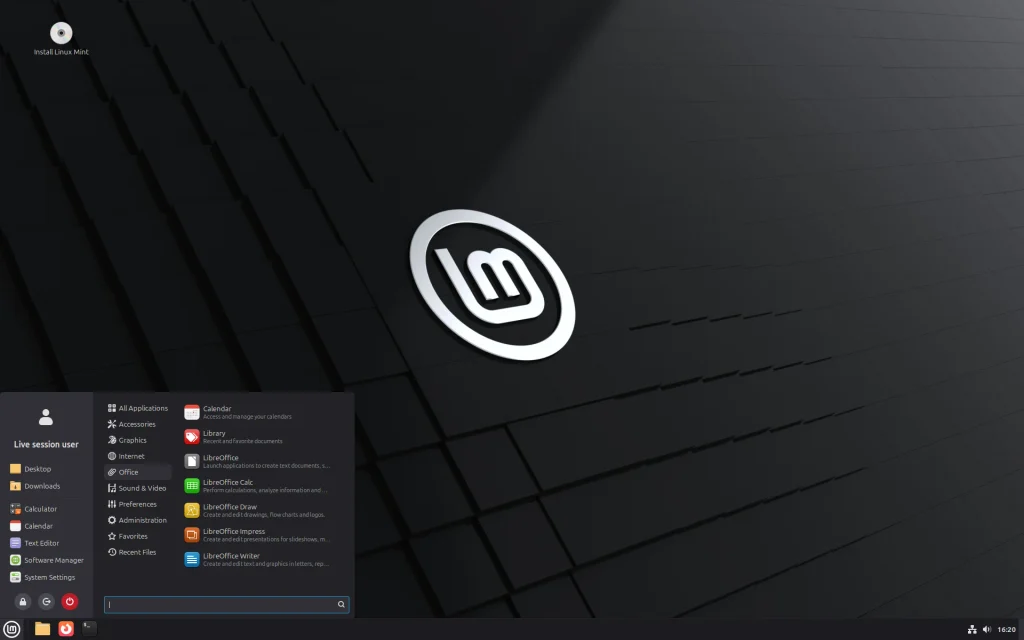
What Is Linux Mint 22.3 “Zena”?
Linux Mint 22.3 is the newest major version of the Linux Mint desktop operating system. It is based on Ubuntu Noble and comes with the Linux kernel 6.14. The release is available in three major desktop editions: Cinnamon, MATE, and Xfce.
The Cinnamon edition remains the flagship experience and is developed primarily by the Linux Mint project itself.
Linux Mint’s philosophy is relatively simple: provide a desktop operating system that works out of the box without forcing users to spend hours configuring the system.
That makes it particularly interesting for Windows users, students, developers, professionals, and people who want to reuse older computers.
1. A Smarter System Information Tool
One of the most practical improvements in Linux Mint 22.3 is the redesigned System Information experience.
The previous System Reports tool has been expanded and renamed System Information. It now provides additional information designed to make hardware troubleshooting easier.
For example, users can find dedicated information about:
- USB devices
- Graphics hardware
- PCI devices
- BIOS
- Hardware acceleration
- Drivers
This can be particularly useful when troubleshooting problems involving graphics cards, USB devices, drivers, or BIOS settings.
For new Linux users, having this information available in a graphical interface can make troubleshooting considerably easier.
2. Cinnamon 6.6 Brings Major Desktop Improvements
Linux Mint 22.3 comes with Cinnamon 6.6, bringing several improvements to the desktop environment.
One of the most visible changes is the redesigned application menu.
The new menu provides a sidebar containing areas such as your avatar, places, and favorite applications. Users can also customize aspects of the menu depending on their preferred workflow.
This is a good example of how Linux Mint focuses not only on adding new technology but also on improving everyday desktop interaction.
3. Better Keyboard and Input Method Support
Another important improvement is keyboard and input-method support.
Cinnamon 6.6 improves integration between traditional keyboard layouts and IBus input methods. The improvements also extend to Wayland support.
For multilingual users, this can be particularly useful.
Linux Mint has also redesigned its on-screen keyboard, allowing it to work more naturally with different input methods and keyboard layouts.
These improvements may not look as exciting as a completely redesigned desktop, but they can make everyday computer usage much smoother.

4. Nemo File Manager Gets Useful Features
The Nemo file manager also receives several improvements in Linux Mint 22.3.
One useful addition is a template manager, which makes it easier to create new files from templates.
File operations can also now be paused and resumed, which can be useful when transferring large amounts of data.
Search functionality has also been improved, while thumbnail handling and split-pane behavior have received additional refinements.
These are small changes individually, but they contribute to a better overall desktop experience.
5. Better Troubleshooting for Hardware
Linux Mint 22.3 puts noticeable attention on troubleshooting.
The new system information pages can help users identify exactly what hardware is installed and which drivers are being used.
The BIOS page, for example, provides information about the motherboard, BIOS version, boot mode, and Secure Boot.
There is also a new System Administration tool that provides options related to the boot menu and boot parameters.
This can be especially useful for people running dual-boot configurations or multiple Linux kernel versions.
6. Improvements Beyond the Desktop
Linux Mint 22.3 isn’t only about Cinnamon.
Several of the project’s XApps have also received updates.
Timeshift can now pause and resume snapshots, while Warpinator adds IPv6 support and text messaging capabilities. The Update Manager also provides a warning when a restart is recommended after updates.
The backup utility has also received an “Include All” option, making it easier to include hidden files and folders when creating backups.
These additions demonstrate an important aspect of Linux Mint: improving the tools that users rely on regularly.
7. Is Linux Mint 22.3 Good for Older Computers?
One of Linux Mint’s biggest attractions is its compatibility with a wide range of hardware.
According to the official release information, Linux Mint 22.3 requires at least 2 GB of RAM, with 4 GB recommended for comfortable usage. It requires at least 20 GB of disk space, while 100 GB is recommended.
However, actual performance will depend on the processor, storage technology, graphics hardware, and desktop edition.
If you have an older computer, the Xfce edition is specifically designed to use fewer resources than Cinnamon.
That makes Linux Mint an option worth considering for computers that feel slow with modern operating systems.
8. Should You Upgrade to Linux Mint 22.3?
If you are already running Linux Mint 22, 22.1, or 22.2, the official upgrade path to Linux Mint 22.3 is available through the Update Manager. Linux Mint recommends creating a Timeshift snapshot before upgrading.
The general process is:
- Create a Timeshift system snapshot.
- Update Cinnamon spices such as themes, applets, and extensions.
- Open Update Manager.
- Refresh the package information.
- Select the option to upgrade to Linux Mint 22.3 “Zena”.
- Follow the upgrade instructions.
- Restart the computer.
A backup is especially important before any major operating-system upgrade.

Final Thoughts
Linux Mint 22.3 “Zena” isn’t trying to completely reinvent the Linux desktop. Instead, it focuses on making an already familiar experience more polished.
The redesigned application menu, improved Cinnamon 6.6, better keyboard and input support, enhanced hardware information, improved Nemo file manager, and additional troubleshooting tools make this release an interesting upgrade for both existing Linux Mint users and people considering Linux for the first time.
With support extending until 2029, Linux Mint 22.3 also offers a relatively long runway for users who want a stable desktop operating system rather than constantly chasing major releases.
For Windows users curious about Linux, students learning open-source technology, developers looking for a flexible desktop environment, or anyone trying to give an older PC a new life, Linux Mint 22.3 is certainly worth exploring.
You can also choose between Cinnamon, MATE, and Xfce depending on your hardware and desktop preferences.
Suggested SEO tags
Linux Mint 22.3, Linux Mint 22.3 Zena, Linux Mint 2026, latest Linux Mint version, Linux Mint features, Linux Mint Cinnamon 6.6, Linux operating system, open source software, Linux for beginners, Linux Mint upgrade
10 target keywords are naturally included throughout the article, so you can use this directly as a blog post without keyword-stuffing.